The Hidden Cost of Your Messy Gaming Desk
I still remember the first time I sat down to play on my new rig. I was so excited to jump into the action, but within minutes, my mood shifted. My mouse kept dragging against a pile of tangled cords, and my keyboard cable felt like it was stuck in a knot that defied physics. I spent more time wrestling with wires than actually enjoying my game. It felt like my desk was fighting me, and frankly, I was losing the battle. Every time I reached for my coffee, I worried I would snag a cord and send my headset crashing to the floor. My workspace, which should have been my sanctuary, had become a source of daily stress and frustration.
It is easy to ignore a messy desk for a while, but the reality sets in when things start to break. Those tangled, bent, and stretched cords are not just an eyesore; they are a ticking time bomb for your expensive equipment. When cables are constantly pulled at sharp angles, the internal copper wires begin to fray and weaken. Over time, this leads to connection drops, flickering monitors, or a mouse that just decides to stop working mid-game. It is incredibly discouraging to lose a match or lose progress on a project simply because a cord finally gave up.
Beyond the physical damage, there is a mental weight to living in a cluttered environment. My brain always felt a little bit busier and more distracted when I looked down at the "rat’s nest" of cables under my desk. It is hard to stay focused on a task or get into a "flow state" when your physical space feels chaotic. You might think it is just a minor annoyance, but clearing that clutter brings a sense of calm that is hard to describe until you actually experience it. It makes you want to sit down and work or play, rather than dreading the mess that awaits you.
Managing your cables is not about having the perfect, magazine-style setup overnight. It is about taking back control of your environment so your equipment lasts longer and your mind stays clear. You do not need expensive tools or a degree in engineering to make a massive difference. All it takes is a little bit of time and a simple system that keeps things moving in the right direction. Let’s change how you look at your desk, one wire at a time.
Creating Your Cable Management System
You do not need to overhaul your entire office in one afternoon to see results. The most effective approach is to build a system that works for your specific setup. Start by disconnecting everything and clearing your desk surface entirely. This gives you a blank slate and allows you to see exactly how much space you have to work with. While your desk is clear, take a moment to wipe it down; it is the best time to clean those hard-to-reach corners.
Planning Your Cable Paths
Before you plug anything back in, think about where your power and data sources are located. Try to keep your power cables separated from your data and display cables as much as possible. This simple trick makes troubleshooting much easier later on and helps prevent potential signal interference. If you have a height-adjustable desk, make sure you leave enough slack in your cables to account for the movement. You do not want a cable pulling tight and damaging a port when you stand up to work.
Using Basic Tools to Secure Your Gear
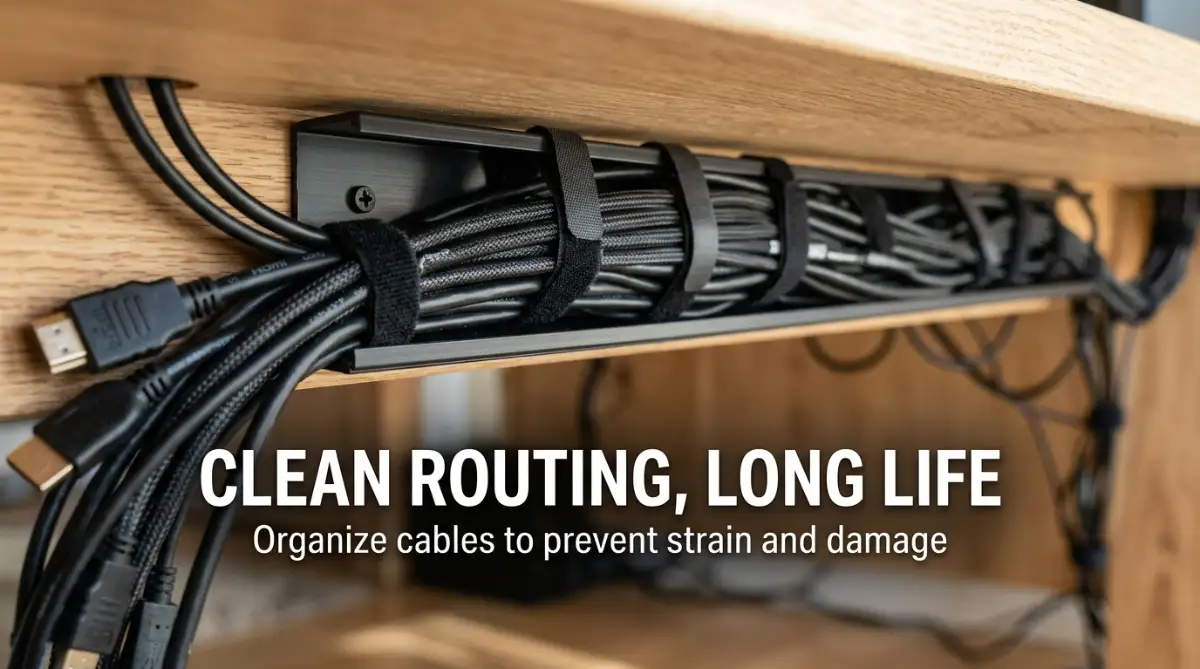
You do not need fancy, expensive accessories to keep things organized. Simple items like velcro ties are a game-changer because they are reusable and do not pinch your cables like plastic zip ties can. Group cables that go in the same direction, like the cords running to your monitor and your PC tower. Gently bind them together at consistent intervals, ensuring there is no tension on the connectors. If you have cables hanging loosely, use adhesive clips to guide them along the underside of your desk or down the back of your desk legs.
The Power Strip Strategy
One of the biggest culprits of desk clutter is the massive power strip sitting on the floor or taking up precious real estate. Try mounting your power strip to the underside of your desk or the back panel. This keeps the brick off the floor, away from dust, and prevents you from accidentally kicking it. If you have bulky power bricks, use a small tray or a J-channel to tuck them away out of sight. Keeping these heavy items off the desk surface instantly makes your space look cleaner and more professional.
Pro Tip: I once learned the hard way that tightening cable ties too much is a recipe for disaster. My headset stopped working because I had bundled it too tightly with my monitor power cord, which caused internal wire fatigue over time. Now, I always make sure my bundles have just enough "breathing room" so that no individual cord is under stress. It is a small habit, but it has saved me from replacing perfectly good peripherals.
Understanding the Importance of Airflow
Many of us forget that electronics need to breathe. If you have a tangle of power cables bunched together behind your PC, they can actually trap heat and block your device’s ventilation. Always route your cables so they do not block the air intake or exhaust fans of your gaming rig. Proper airflow keeps your system cool, which directly improves performance and protects your internal components from overheating.
To see these tips in action and understand how to route your own cables like a professional, check out this guide:
Maintaining Your New Setup
Once you have your system in place, keep it maintained. When you add a new piece of gear, take five minutes to integrate its cable into your existing path rather than just tossing it behind the desk. If you notice a cable starting to look frayed or bent, address it immediately before it causes a connection failure. Consistency is the key to keeping your sanctuary clutter-free for the long haul.
By treating your cables with care and giving them a defined path, you are doing more than just cleaning up. You are protecting your investment and creating a workspace that helps you stay sharp and focused. You will be surprised at how much better it feels to sit down at a desk that is orderly, functional, and ready for your next big win. Remember, the goal is not perfection, but progress toward a space that truly works for you.
Mastering Your Workspace: Advanced Secrets for Tech Longevity
Keeping your desk setup clean is more than just about aesthetics; it is about protecting your hardware from unnecessary wear. Many people treat cable management as a one-time chore, but the real secret lies in proactive maintenance. Once you have established your primary routing, you must treat your cables like the delicate arteries of your gaming rig.
If you want your peripherals to last for years, you should invest in reusable silicone cable ties instead of permanent plastic ones. These allow you to adjust your setup whenever you add a new device without cutting or damaging existing wires. I have found that keeping a small "cable station" in a drawer with extra ties and clips makes it incredibly easy to manage new gear the moment it arrives.
Another expert secret is to use color-coded cable sleeves if you have a complex setup with many monitors and peripherals. By grouping your display cables in one sleeve and power cables in another, you can instantly identify which cord belongs to which device during a move or an upgrade. This simple trick prevents the panic of accidentally unplugging the wrong device when you are in the middle of a high-stakes gaming session.
The Power of Cable slack and Tension Management
One mistake many people make is pulling their cables too tight to achieve a "perfect" look. You must always leave a small amount of slack at every connection point, especially near the USB ports on your PC or the back of your monitor. A cable pulled tight acts like a bowstring; it puts constant pressure on the internal pins of your port, which can eventually lead to a broken connection that leaves your PC unable to detect your gear.
To manage this properly, use adhesive cable anchors placed a few inches away from the port itself. These anchors take the weight of the cord off the port, ensuring that even if you accidentally tug on the cable, the stress is absorbed by the anchor rather than the sensitive hardware inside. This is a small adjustment that can save you from having to replace an expensive mouse or keyboard down the road.
If you are using high-end VR gear, you are likely dealing with even more complex cabling requirements. Making sure your VR headset cable remains tangle-free is essential for both your safety and the longevity of the expensive fiber optics inside the cord. You can find detailed research on managing high-speed data integrity which highlights why keeping these cables straight and away from heat sources is better for performance.
Sustaining Your Organized Space Daily
Long-term success comes down to how you handle "cable creep," which happens when your desk slowly becomes cluttered again over several months. Set a reminder once every season to check your under-desk tray and ensure all ties are still secure. If you notice a cable is getting hot or being pinched by the edge of your desk, fix it immediately to keep your gaming audio experience smooth and lag-free.
You should also keep your drone controller and navigation gear organized in a separate section of your desk to prevent cross-contamination of your gaming wires. By keeping these specialized tools in a designated spot, you ensure that your main gaming setup stays dedicated to its purpose. This level of organization creates a sense of professional flow that makes you feel ready to perform your best every single time you sit down.
Why Sloppy Setup Habits Lead to Hardware Failure
It is incredibly easy to fall into the trap of "just tossing it behind the desk" when you are tired. This behavior creates a chaotic tangle that puts massive amounts of strain on the points where cables meet their connectors. When you leave cables dangling or stretched, you are essentially asking for a short circuit or data corruption to happen at the most inconvenient moment.
Many people also make the mistake of using heavy-duty duct tape or permanent adhesives to hold cables in place. This is a dangerous habit because the chemicals in the tape can degrade the protective rubber coating on your cords. Over time, the rubber becomes sticky and brittle, exposing the inner wires and creating a genuine fire hazard.
Another emotional pitfall is ignoring the warning signs of a failing cable because it is "too much work" to reroute it. If your mouse cursor flickers or your keyboard lights occasionally blink out, do not just ignore it and hope it goes away. That cable is telling you it is dying, and if you do not replace or fix the routing now, you will lose that peripheral entirely.
Protecting Your Investment Through Care
Think about the time and money you spent building your gaming dream setup. Every piece of gear is a reflection of your hard work and passion. Allowing your cords to get crushed under heavy desk legs or twisted into knots is essentially ignoring the health of your investment.
You do not want to be the person who loses a competitive match because a wire finally snapped under the pressure of a sharp bend. Take the time to look behind your desk today. If you see a mess, view it as an opportunity to protect the tools that bring you joy and success.
Your Path to a Perfect Gaming Sanctuary
Achieving a clean, professional desk is not about being perfect; it is about respecting your gear. By keeping your cables organized, you are ensuring that your equipment performs at its peak potential whenever you need it. You are also creating a mental space where you can focus entirely on your game or your projects without distraction.
I started this journey with a desk that looked like a bird's nest, and honestly, the shift in my mood was instant once I cleared the clutter. My gear stopped acting up, and I finally felt like I owned a real "command center" instead of just a pile of wires. You have everything you need to start this right now, so do not put it off until tomorrow. Grab a few simple ties, clear the mess, and enjoy the feeling of a desk that finally works for you, not against you.
Common Questions About Gaming Desk Organization
Is it safe to bundle all my power cables together?
It is generally better to keep power cables separate from data cables to avoid electrical interference. If you must bundle them, ensure they are loosely organized and never tightly tied, as this can cause heat buildup.
How often should I re-evaluate my cable management?
I recommend a quick check every three months or whenever you add a new device to your setup. This prevents small, unorganized wires from turning into a massive, tangled nest over time.
Will cable management actually make my computer run better?
While it does not directly change your software settings, it keeps your equipment cool and prevents physical damage. A setup with good airflow and zero cord strain is always more reliable than one that is cluttered and overheating.
What is the best way to hide bulky power bricks?
The most effective way is to mount a J-channel or a mesh cable tray under your desk. This keeps the weight off the floor and hides the bricks from view while allowing them to breathe.
Disclaimer: The information provided in this article is for educational purposes only. Always follow the manufacturer's safety guidelines when handling electrical equipment and power supplies to prevent accidents or damage to your hardware.