The Hidden Heartbreak Behind Zero Views
I remember sitting in my room at 2 AM, staring at my YouTube dashboard with tears in my eyes. I had just spent two whole weeks filming and editing what I thought was my masterpiece. I was so sure this was the video that would finally make my channel blow up. But after three days, it was stuck at just 14 views—and I am pretty sure my mom was half of them. I felt totally crushed and almost deleted my entire channel. It took me a long time to realize that my ideas were actually good, but my messy editing was pushing people away.
You spend an entire week conceptualizing a great video idea. You sit in front of the camera, pouring your heart out to your audience.
Then, you spend countless hours cutting the footage, adding music, and rendering the final file. You finally hit that upload button on YouTube. You sit back, refresh your browser, and wait for the magic to happen. But the notification bell stays completely silent.
Hours turn into days, and your video sits there with single-digit views. This crushing disappointment is an incredibly painful experience for any creator. You start wondering if your personality is simply too boring. The truth is, your core idea is probably fantastic.
The real villain destroying your channel is poor video editing. Bad editing choices act like a giant brick wall between you and your viewers. We blindly follow terrible advice on the internet because we desperately want our channels to grow.
Why You Keep Falling into the Same Advice Traps
It is not your fault that you are confused about how to edit properly. The internet is filled with self-proclaimed gurus who give absolutely terrible advice.
- The software myth: They convince you that buying highly expensive editing software will magically make your videos go viral. This simply drains your wallet.
- The template trap: Bad teachers tell you to download massive packs of flashy transitions. They claim these flashy elements grab attention, but they actually just annoy your viewers.
- Ignoring the foundation: Most tutorials focus on fancy color grading and cool visual effects. They completely ignore the absolute basics of storytelling and pacing.
- The AI overload: People push you to use automatic editing bots for everything. This completely strips away your unique human personality from the video.
How Bad Editing Destroys Your Confidence
When your videos fail to perform, it takes a massive toll on your mental health. You begin to question your own worth as a creator.
- The silent burnout: Editing a video takes massive energy. When the video fails, that energy is completely wasted, leading to severe creative burnout.
- The comparison trap: You look at bigger channels and wonder why their videos look so professional. You falsely believe they have a secret formula you will never learn.
- Imposter syndrome: You start feeling like a complete fake. You wonder if you should just quit YouTube and go back to a normal hobby.
- Financial anxiety: If you are trying to build a business, low views mean zero income. This creates massive stress every single day.
You have probably watched hundreds of tutorials by now. Yet, every time you open your editing timeline, you feel completely overwhelmed by the mess of clips. Let us use a simple real-life analogy to understand this problem. Imagine you go to a highly rated restaurant and order a steak.
The chef uses the finest quality meat in the world. However, the waiter serves the steak on a dirty paper plate covered in mud. You would absolutely refuse to eat it, right? This is exactly what happens when you have a great video topic but terrible editing.
Your viewers see the messy presentation and instantly click away. They do not have the patience to dig through bad audio or boring cuts. Your viewers owe you nothing, and their attention span is shorter than ever. If you do not respect their time in the editing room, the YouTube algorithm will punish you severely.
We need to fix this broken system right now. You do not need a fancy film degree to make highly engaging videos. You just need to understand basic human psychology. Good editing is supposed to be completely invisible.
If your audience actually notices your editing, you have already made a mistake. Let us look at how you can build a rock-solid editing workflow starting today.

The Professional Creator's Playbook: Fixing Your Foundation
We are going to completely rebuild the way you look at your video timeline. I am going to walk you through three fundamental rules that will instantly change your channel.
These are not fake hacks or shortcuts. These are proven, science-based editing principles used by top television producers and successful YouTubers. By applying these exact steps, you will keep your viewers glued to the screen.
The Silent Killer of Retention (Fixing Your Audio Mix)
Most beginners obsess over getting 4K resolution and sharp video quality. They spend hundreds of dollars on fancy lenses.
But here is a highly uncomfortable truth. Viewers will easily forgive bad video quality, but they will never forgive bad audio.
If your microphone sounds like you are inside a tin can, people will click away in three seconds. If your background music is too loud, people will become instantly frustrated.
The Background Music Nightmare
Imagine watching a tense, emotional scene in a movie. The actor is whispering a secret, but a loud heavy metal song is playing over their voice.
You would immediately reach for the remote control. This is exactly what you are doing to your viewers when your music levels are incorrect.
When you add a background track, it should act like a gentle supporting actor. It should never compete with your main speaking voice.
How to Balance Your Audio Correctly
I want you to try a very specific trick on your next edit. Lower your background music to at least -25 decibels on your software's audio meter.
Play the video and close your eyes. If you have to struggle even slightly to hear your own voice, the music is still too loud.
Another great trick is to apply an effect called "Audio Ducking." This is a smart feature found in most software today.
It automatically lowers the background music whenever you start speaking. When you take a breath, the music gently rises back up.
This creates an incredibly professional, polished feeling for the viewer.
Avoiding Sudden Volume Spikes
Nothing angers a viewer more than having to constantly adjust their volume button. In one clip, you are whispering softly.
In the next clip, you scream into the microphone. You must use an "Audio Compressor" on your main vocal track.
A compressor simply squashes the loudest parts of your voice and raises the quietest parts. This guarantees a smooth, enjoyable listening experience for anyone wearing headphones.
The Transition Trap (Why Less is Always More)
When beginners open editing software for the first time, they get excited. They see hundreds of amazing transitions like star wipes, screen glitches, and 3D spinning boxes.
They decide to put a different transition between every single clip. They think this makes the video look highly dynamic and professional.
This is the fastest way to make your video look like a cheap school project.
The Cognitive Overload Problem
Let us look at the science behind how the human brain processes video. Every time you use a crazy, flashy transition, the viewer's brain has to stop and process it.
It distracts them completely from what you are actually saying. If you do this twenty times in a single video, the viewer becomes mentally exhausted.
They will simply close the video to relieve their mental fatigue. Professional editors almost never use flashy transitions.
Embracing the Hard Cut
Look closely at your favorite high-budget movie or a top-tier YouTube documentary. Notice how they move from one scene to the next.
They almost exclusively use simple, clean "Hard Cuts." A hard cut is when one video clip immediately switches to the next clip with zero effects.
It feels completely natural because it mimics how the human eye works. When you turn your head to look at something else, your vision does not spin in a 3D circle.
A hard cut keeps the story moving forward without pulling the viewer out of the moment.
When to Actually Use Transitions
There are a few rare times when a transition is helpful. If you are changing the topic of the video entirely, a smooth cross-dissolve can signal a change in mood.
If you want to show that a lot of time has passed, a simple fade to black works perfectly. But ninety-five percent of your video should rely entirely on basic cuts.
Delete all those massive transition packs from your hard drive today. Your viewers will thank you for giving them a clean, easy watching experience.
The Pacing Problem (Eliminating the Dead Space)
If you want to grow on YouTube, you need high audience retention. You want people to watch fifty, sixty, or even seventy percent of your entire video.
Every time you pause to think about your next word, the viewer gets bored. Every time you say "um" or "ah", you give them a reason to click away.
Dead space is the absolute enemy of a good YouTube video.
The Three-Second Rule
Think about the modern internet user scrolling on their phone. They are constantly looking for the next hit of dopamine. If your video stands still for more than three seconds, they get itchy. You must ruthlessly cut out every single unnecessary breath and pause from your footage.
If you make a mistake while filming, do not just leave it in to show personality. Cut it out immediately. Make your sentences flow right into each other seamlessly. This technique is called "Jump Cutting," and it is the secret weapon of every successful vlogger.
The Art of the J-Cut and L-Cut
If jump cuts look too choppy for your style, you need to learn J-cuts and L-cuts. These are incredibly simple tricks that make your pacing flow like water. In a J-cut, you hear the audio of the next video clip before you actually see the picture. Your ears prepare your brain for the visual change.
In an L-cut, you see the next video clip, but the audio from the previous clip keeps playing for a moment. This makes the conversation feel incredibly natural and highly engaging.
These tiny overlapping tricks hide your editing mistakes beautifully.
If you are still a little confused about how J-cuts and L-cuts actually look on screen, I found this quick video that makes it super easy to understand. Watch this short visual example below, and then keep reading to find out how to stop making your viewers bored!
Show, Don't Just Tell
Another massive pacing mistake is talking for three minutes straight without changing the screen. If you are explaining a complex topic, your face is not enough.
You must use B-roll footage to keep the viewer stimulated. B-roll simply means supporting video clips that play over your main voiceover. If you are talking about fixing a car, show a close-up clip of an engine. If you are reviewing a piece of software, show a screen recording of the menu.
Changing the visual elements every ten to fifteen seconds completely resets the viewer's attention span. It keeps their eyes actively searching the screen, which locks them into your content.
Leveling Up: Advanced Editing Secrets for High Viewer Retention
You have already fixed your audio levels and cleaned up your messy transitions. Now, it is time to step into the big leagues.
I want to share the advanced secrets that separate amateur hobbyists from highly paid professional creators. These techniques might seem small at first glance, but they have a massive psychological impact on your viewers.
When you apply these next steps, your videos will instantly feel more expensive and polished. Let us dive into the actual workflow habits that will save you hours of frustration.
Mastering the Art of Visual Mood (Color Correction vs. Grading)
Most beginners shoot their video, drop it on the timeline, and immediately throw a heavy filter on top of it. They want their video to look like a cinematic Hollywood movie instantly.
This is a massive mistake that completely ruins the natural look of your footage. Before you can make your video look cool, you must make it look normal.
This process is broken down into two very distinct phases. You have color correction, and then you have color grading.
The Primer and the Paint Analogy
Think about painting a dirty, uneven wall in your house. You would never apply expensive blue paint directly over holes and dark spots. You must first clean the wall and apply a smooth, neutral white primer. Color correction is your primer.
You need to adjust the brightness and fix the white balance so your skin looks like normal human skin. If you look like a bright orange carrot because of bad room lighting, a cinematic filter will only make it look worse.
Once your footage looks completely natural, then you can move on to the fun part.
Adding Emotional Color Grading
Color grading is where you add a specific mood to your story. If you are telling a sad story, you might add a slight blue tint to make the scene feel cold.
If you are filming a fun travel vlog at the beach, you want to boost the warm orange and yellow tones. Never let your color grading distract from the actual subject of the video.
Keep your adjustments subtle. A gentle touch of contrast and color saturation is usually all you need to keep your audience visually engaged.
The "Folder First" Workflow Strategy
Let me tell you about a nightmare that almost every beginner editor faces. You spend three days working on a masterpiece. You close the software to take a break. When you open the project the next morning, half of your video clips are completely red, displaying a terrifying "Media Offline" error. This happens because you did not organize your raw files properly before you started editing. The software completely lost track of where your video clips are hiding on your computer.
I actually learned this lesson the hard way after losing a massive video project right before I was supposed to upload it. Now, my personal rule is to never drag a single file into my editing timeline until I have moved it out of my messy computer downloads into a dedicated project folder. Trust me, spending just two minutes organizing your files today will save you from having a complete panic attack tomorrow.
Building Your Digital Briefcase
Before you even open your editing program, you must build a strict folder structure on your hard drive. Create one main master folder named after your video topic.
Inside that master folder, create four separate sub-folders. Name them exactly like this: "01_Footage", "02_Audio", "03_Graphics", and "04_Project_Files".
Put every single camera clip into the footage folder. Put all your background music and sound effects into the audio folder.
Never pull a file straight from your computer's messy download folder into your editing timeline.
The Long-Term Peace of Mind
When you move all your assets into these dedicated folders first, the editing software knows exactly where to look. If you buy a new external hard drive next month, you can just drag the entire master folder over.
Your project will open perfectly without a single missing file error. This tiny five-minute habit of organizing your files will literally save you hundreds of hours of lost work over your YouTube career.
It completely removes the technical anxiety, allowing you to focus entirely on being creative.
Perfecting On-Screen Text and Graphics
Adding text to your screen is a great way to highlight important points and keep viewers engaged. However, poorly designed text will make your video look incredibly cheap.
Many new creators use massive, bright red fonts with harsh black borders right in the middle of the screen. This completely covers your face and annoys the audience.
Finding the Safe Zones
You have to remember that people watch YouTube on many different devices. Some watch on massive smart TVs, while most watch on tiny mobile phone screens.
If you place your text too close to the edge of the video, it will get cut off on a smartphone. Almost all modern editing software has a feature called " Safe Margins."
Turn this feature on. It places a helpful invisible box on your screen.
Always keep your text inside this inner box to guarantee every single viewer can read it perfectly.
The Lower Third Trick
Instead of putting text in the center of the screen, use a professional "Lower Third." This simply means placing your text in the bottom left or bottom right corner of the video.
Use clean, modern fonts like Montserrat or Helvetica. Choose white text with a very soft, dark shadow behind it so it pops against any background.
Subtle, clean text looks infinitely better than giant, messy graphics. It gives your video that premium television broadcast feeling.

The Danger Zone: 5 Massive Traps That Will Ruin Your Export
Even with a highly organized workflow, human error can easily sneak into your project. When you sit in front of a bright screen for hours, your brain starts to miss obvious problems.
I want to warn you about the most common traps that completely destroy otherwise great videos. If you ignore these specific pitfalls, you will severely damage your channel's growth and reputation.
Here are the five biggest mistakes you must actively avoid.
1. Refusing to Use Keyboard Shortcuts
When you first start out, it feels natural to click on every single tool using your computer mouse. You click the razor tool, move to the timeline, cut the clip, and then click the arrow tool again.
This creates a painfully slow, exhausting workflow. Clicking menus manually drains your creative energy and leads directly to burnout.
You must force yourself to learn the basic keyboard shortcuts for your specific software. Learn the shortcut for making a cut, deleting a clip, and zooming in on the timeline.
After a few days of practice, your fingers will fly across the keyboard, and you will cut your editing time completely in half.
2. Blindly Trusting Automated AI Editors
We live in an age where artificial intelligence promises to edit your entire video with one click. Many new creators just feed their raw footage into an AI tool and upload whatever it spits out.
This is a terrible strategy for building a loyal, long-term audience. AI tools are great for basic tasks like removing silent pauses or generating subtitles.
However, AI does not understand human emotion, comedic timing, or storytelling. If you let an automated bot make all your creative choices, your video will feel robotic and completely soulless.
Always keep your human hands on the final edit to ensure your unique personality shines through.
3. Messing Up the Timeline Frame Rates
This is a highly technical mistake that ruins the actual playback quality of your video. Let us say you film your main camera talking head at 24 frames per second (fps).
Then, you film your B-roll action shots with your phone at 60 frames per second. If you drop a 60fps clip into a 24fps timeline without adjusting it, the video will look incredibly glitchy.
It will have a weird, stuttering effect that makes viewers feel physically dizzy. Always double-check your project settings before you start cutting.
Match your editing timeline to the exact frame rate of your primary camera footage for a smooth, professional viewing experience.
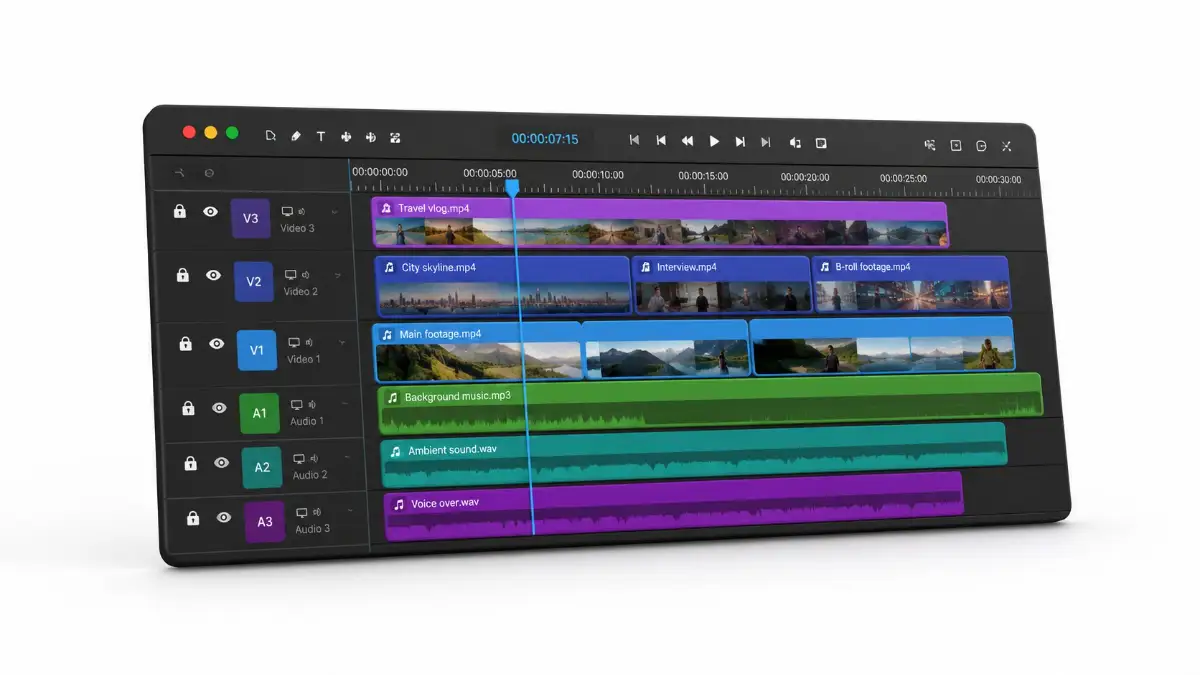
4. Creating a Chaotic, Stacked Timeline
Some creators treat their editing timeline like a messy digital trash can. They stack ten different layers of video on top of each other, hiding mistakes underneath. They leave random audio clips floating at the end of the project. A messy timeline directly causes your editing software to crash.
When your computer tries to read ten layers of hidden 4K video at once, it simply gives up and freezes. Always clean up your timeline as you work.
Delete clips you are no longer using. Flatten your video layers down to just one or two tracks.
A clean workspace keeps your software running smoothly and prevents those heartbreaking software crashes.
5. Skipping the "Fresh Eyes" Final Review
You just spent six hours editing a video. You are exhausted, hungry, and just want it to be over.
You quickly hit the export button and immediately upload it to YouTube. Two days later, a commenter points out that you misspelled a giant word on the screen for three whole minutes.
This happens because of editor fatigue. When you stare at the same clips for hours, your brain literally stops seeing the mistakes.
You must step away from your computer before doing a final review. Export the video, go to sleep, and watch it on your phone the next morning while drinking coffee.
Watching it with fresh eyes on a different device will instantly reveal audio spikes, weird cuts, or spelling errors before the public ever sees them.
Your Next Steps to YouTube Success (Taking Action Today)
We have covered a massive amount of highly practical ground together. You now know exactly why those heavy transitions and loud music tracks were hurting your channel.
More importantly, you possess the exact professional blueprint to fix these problems immediately. You understand the psychology of a clean cut and the incredible value of proper file organization.
Editing a video should never feel like a confusing chore or a frustrating battle against your computer. It should feel like putting together a beautiful puzzle that tells your unique story.
It is perfectly normal if you feel slightly overwhelmed by all these new rules. Do not try to master every single trick in one day.
Editing is just like learning to ride a bicycle. You might stumble a bit at first, but muscle memory quickly takes over. For your very next YouTube video, I want you to focus on just two things. Focus heavily on balancing your audio levels correctly, and practice using clean, simple hard cuts.
Ignore the fancy graphics and cinematic colors for now. Just build a rock-solid foundation that respects your viewer's time and attention span. Every time you practice these correct habits, your confidence will grow immensely. Your viewers will absolutely notice the jump in quality. They will stay watching longer, they will hit the subscribe button more often, and the YouTube algorithm will finally start pushing your content. Stop letting bad editing hide your amazing ideas.
Open your software today, organize your folders properly, and start crafting the high-quality content you are truly capable of making. Your future audience is waiting for you.
Disclaimer: The tips and strategies shared in this article ("How Bad Video Editing is Secretly Killing Your YouTube Money") are based on my own personal experience and general industry practices. Earning money on YouTube takes time and hard work, and while fixing your editing will help keep viewers watching, your actual income will always depend on your specific niche, audience size, and overall content quality.