Broken TVs, Stubbed Toes, and the Scary Reality of Unsafe VR Spaces
I still remember the sudden sound of shattering glass during my first week with room-scale virtual reality. I was deeply immersed in an intense virtual dodgeball game, dodging a fast-moving object thrown straight at my head.
In the real world, I lunged violently to my left and swung my arm out as hard as I could. My hand hit my expensive flat-screen television with full force, knocking it right off its stand onto the hard floor. My knuckles were bruised, my controller ring was cracked in half, and my favorite display screen was permanently ruined in less than a second.
That painful moment opened my eyes to how dangerous virtual reality can be when you ignore physical room boundaries. When you strap on a headset, your eyes and ears completely leave the real world behind. Your brain quickly forgets where your couch, walls, coffee table, and ceiling fans are located.
Thousands of virtual reality fans deal with bruised shins, broken ceiling light fixtures, smashed smart devices, and damaged controllers every single month. The anxiety of accidentally hitting something real ruins the magic of full immersion. You end up playing cautiously, constant fear holding you back from moving freely around your virtual world.
Instead of escaping into fun games, you spend half your time wondering if your next swing will hit a wall. Your gaming session turns into a stressful chore rather than a relaxed, fun escape after a long day. Creating a properly secured physical space is not just optional for full room scale experiences. It is the single most practical thing you must do before launching any high-action virtual reality software.
Transforming Your Room into an Action-Ready VR Zone
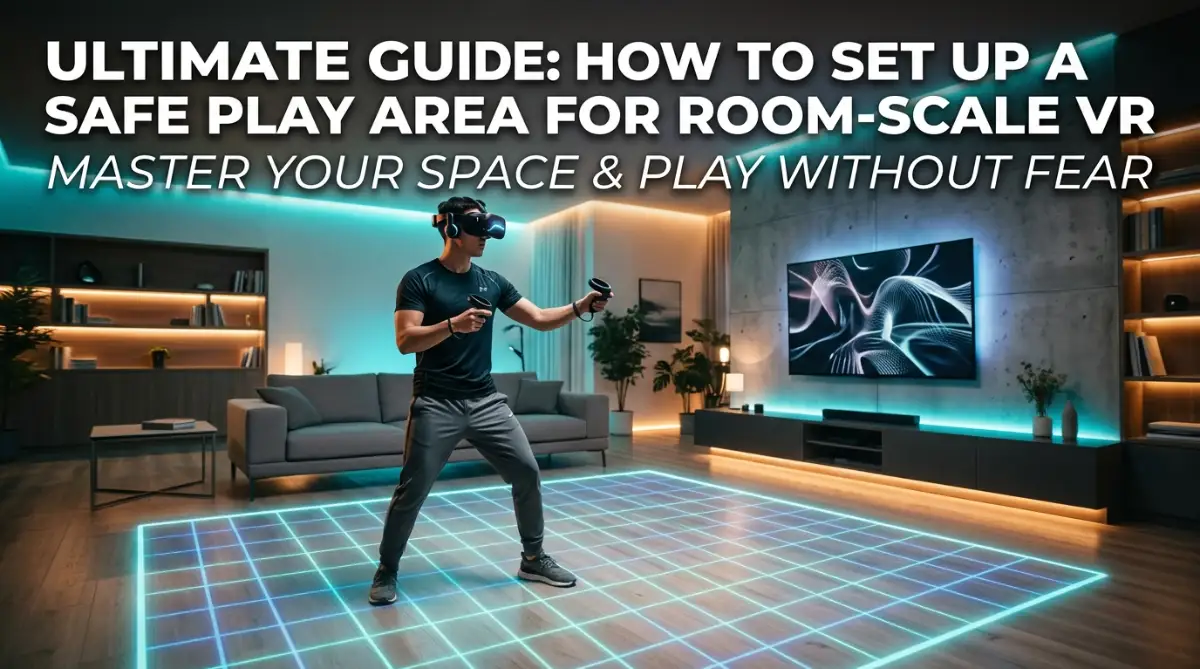
Setting up a safe play space does not mean you need a dedicated empty spare room or an expensive commercial space. You can easily convert a living room, bedroom, or home office into a safe virtual playground with small smart adjustments.
Let us look at the exact steps you can take today to make your physical space dynamic, secure, and stress-free.
Step 1: Calculate Your True Physical Play Clearance
Most virtual reality tracking systems require a bare minimum play boundary of 6.5 feet by 6.5 feet for room-scale movement. However, minimum requirements are rarely enough to keep your hands and head safe during fast physical movements.
You need to measure your space while extending your arms fully outward in a full circle around your body. Walk through your proposed area while swaying your arms sideways, high above your head, and down low toward the floor.
If your fingertips touch a cabinet door, lamp shade, or shelf edge during this test walk, that item is inside your danger zone. Always leave at least one extra foot of buffer space between your maximum arm reach and any hard vertical surface.
Step 2: Establish Sensory Tactile Floor Boundaries
Software boundary walls like Oculus Guardian or SteamVR Chaperone are wonderful, but they are not always fast enough to stop a sudden lunge. When you swing fast in a game, your body moves faster than your brain can process a digital red wall popping up.
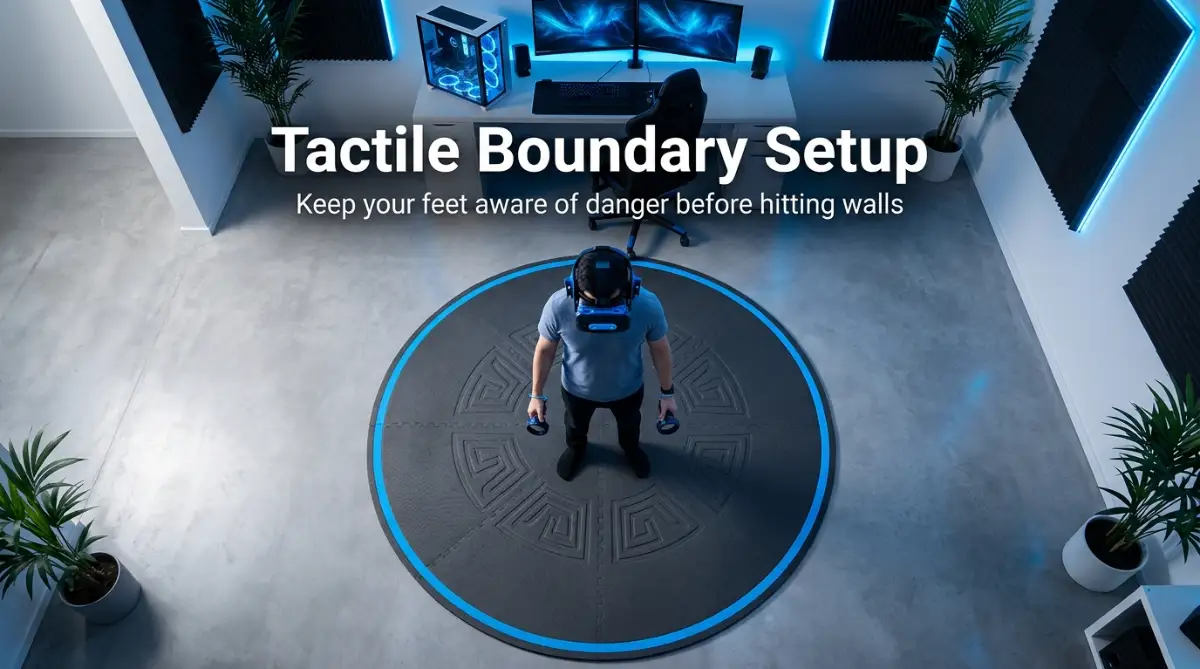
This is why tactile floor feedback is one of the most reliable visual safety hacks available. Place a small circular throw rug, an interlocking foam mat, or a thick yoga mat right in the exact center of your play area. When your bare feet or socks are standing on the textured mat, you immediately know you are completely safe.
The moment one foot steps off the textured foam onto bare floor, your brain registers the boundary shift instantly.
You do not even need to pause your game or look down to know you are drifting too close to a wall.
My Personal VR Safety Realization
Early on, I constantly relied only on digital visual boundaries, but I still smashed my thumb against a wooden desk. The moment I placed a cheap round interlocking yoga mat in the center of my floor, my instincts changed completely. My feet now know where the center is without my eyes having to search for visual safety walls.
Step 3: Neutralize Hidden Environmental Hazards
Look around your room at knee level and foot level to spot smaller hidden hazards that could cause tripping accidents. Loose charging cables, pet toys, low footstools, and small coffee tables are major causes of painful falls in virtual reality.
Move lightweight chairs out of the room or push them firmly against distant side walls before putting on your headset. Pay close attention to ceiling clearance if you are tall or if you like playing sports and jumping games.
Ceiling fans are famous for breaking motion controllers and hurting hands during high jumping throws. If you have a low ceiling fan in your room, turn it off completely before playing and mark its physical location in your mind.
If you want to see a practical visual breakdown of how smart physical room setups prevent common headset tracking errors and physical injury, watch this helpful video walkthrough.
Watch this comprehensive room setup guide to visualize ideal physical space boundaries:
Step 4: Master Cable Overhead Management and Wireless Paths
Tangled wires running across the floor pose a continuous tripping risk during fast 360-degree rotation movements. If you use a wired virtual reality setup connected to a desktop computer, cable management is a key priority.
Consider installing retractable ceiling pulley systems that suspend your main connection wire overhead above your head. These ceiling pulleys keep tension off your headset while keeping long cords completely off your floor space.
If you use a modern wireless standalone headset, your primary focus shifts to keeping your path completely clear of unexpected obstacles. Make sure your wireless router has a direct line of sight to your play space to prevent tracking lag and sudden visual disorientations.
Step 5: Protect Your Controllers, Screens, and Walls
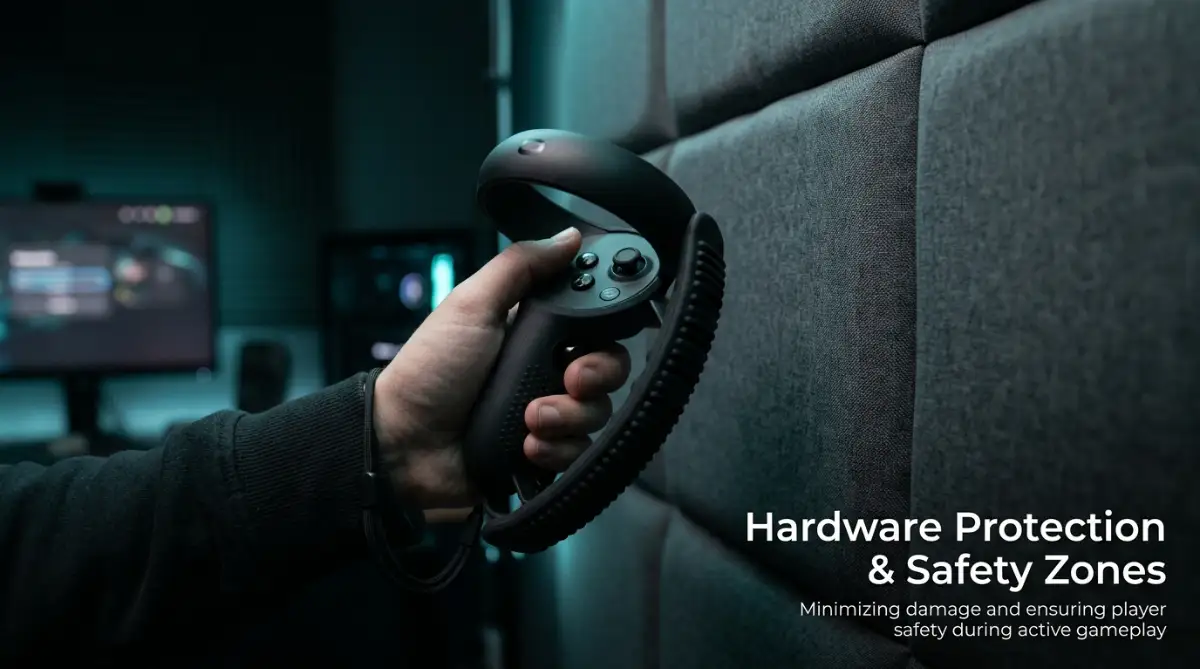
Your hand controllers are the most vulnerable pieces of hardware when playing intense, fast-action motion games. They are constantly swinging near walls, desks, doorframes, and hard furniture pieces at fast speeds.
Incorporate simple physical protection gear to shield your hardware from accidental hard impacts.
Myth vs Reality in VR Room Setup
- Myth: Setting my software boundary flush against my actual wall gives me maximum safe playing space.
- Reality: Physical momentum will cause your arm to hit the wall before you can react to the software warning grid. Always leave a 12-to-18-inch physical safety gap.
- Myth: Bright overhead lights are always best for camera tracking accuracy on modern standalone headsets.
- Reality: Harsh direct light, reflective mirrors, and sunlight can easily blind motion tracking cameras. Balanced, soft ambient light works much better.
- Myth: Wearing heavy shoes gives you better grip and protection during active room-scale gaming.
- Reality: Playing in socks or barefoot allows your feet to feel tactile floor mats much faster, keeping you centered safely.
Purchase soft silicone protective bumpers that slide easily over your controller tracking rings to absorb shock. Always keep the wrist straps tightened firmly around your wrists every single time you put the controllers in your hands.
If you accidentally slip or lose your grip during a fast throw, wrist straps keep the controller from flying across the room.
For your television or high-end computer monitor, consider facing your default starting orientation directly away from the screen. If you do happen to swing forward unexpectedly, you will swing toward a open room area or soft couch instead of an expensive display screen.
Step 6: Light Your Room Correctly for Flawless Motion Tracking
Modern virtual reality headsets rely on built-in optical tracking cameras to map your room environment in real time. If your room is pitch dark, camera tracking will fail, causing your virtual floor to shift or drift unpredictably.
However, extremely bright direct sunlight pouring through open windows can also overpower tracking sensors or permanently burn delicate interior lenses.
Aim for even, soft, ambient LED light distributed evenly throughout your whole playing space. Cover large reflective mirrors or glass picture frames with sheets or blinds, as reflections easily confuse camera tracking software.
Keep sunlight away from direct contact with the interior optical lenses of your headset when storing your gear away.
Step 7: Manage Pets, Family Members, and Room Entrances
Unexpected physical interruptions from pets or family members are a major cause of sudden virtual reality accidents. A small dog or cat entering your room while you are playing a box fitness game can cause severe trips or accidental kicks.
Communicate clearly with family members or housemates before starting an immersive gaming session. Let them know you cannot see or hear them while wearing noise-canceling headphones or tight headsets.
If you are playing in a room with an entryway, position yourself so you do not stand directly in front of an inward-opening door. Keep pets safely secured in another room during high-movement room-scale sessions to keep both them and yourself completely safe.
Step 8: Set Up Smart Software Boundary Cushions
When mapping your digital safety boundary during system setup, never draw the line right against actual solid walls. Always draw your software boundary line at least one to two feet inside your actual physical barriers.
This creates an invisible safety buffer zone between the digital warning grid and your real furniture. When you see the digital grid appear in your display, you still have reaction time to stop your body's physical momentum.
Adjust your software grid sensitivity settings so the warning lines appear slightly earlier when you approach edges quickly.
These small software cushions work together with your floor mats to make hitting real objects nearly impossible.
Step 9: Establish a Quick Pre-Session Safety Checklist
Before putting on your headset for any gaming session, complete a fast 30-second room check routine.
- Look down at the floor to verify all cables, pets, shoes, and loose objects are fully cleared away.
- Check that your central floor mat is situated in the exact middle of your open space.
- Verify your main computer monitor or television screen is positioned behind your default forward view.
- Slip your wrist cords on and tighten the plastic cinches securely around both wrists.
- Double-check that ambient room lighting is turned on and large reflective surfaces are covered.
Taking these quick precautions turns your gaming area into a secure, worry-free zone every single time you play.
You can jump, dodge, crouch, and swing with complete confidence, knowing your physical surroundings are completely safe.
Pro-Level Hacks for Long-Term VR Space Management
Once you set up your basic room boundaries, maintaining a safe area over time requires smart habits and minor routine checks. Many players get comfortable after a few smooth gaming sessions and slowly start letting clutter slide back into their cleared zones.
A laundry basket left near the edge or a pair of slippers tossed on the floor can turn an exciting session into a sudden fall. To keep your play space consistently reliable, treat your virtual room like a dedicated athletic zone that needs quick maintenance.
One powerful technique is using low-profile rubber edge guards on sharp furniture corners near your play perimeter. If your controller or arm happens to graze a wooden coffee table or desk, soft rubber molding absorbs the hit without leaving bruises or scratches.
You can find cheap self-adhesive rubber strip rolls online or at local hardware stores that stick neatly along sharp wooden or glass edges. Another secret utilized by serious room-scale enthusiasts is adjusting floor reflection angles and room acoustics for improved camera tracking.
Hard hardwood floors or polished tile surfaces can reflect bright overhead light fixtures directly into your headset camera lenses. This unexpected bounce light confuses room-mapping algorithms, causing your digital boundary floor level to float up or down randomly.
Placing non-reflective rug mats or soft textured carpets prevents light glare while simultaneously providing excellent physical boundary awareness.
If you want to keep your surrounding gear secure while managing your general home setup, practicing overall organization habits like giving every dollar a purpose helps you budget for dedicated room accessories without overspending.
When you spend hours in immersive virtual worlds, your physical body also experiences physical fatigue and minor joint strain.
Adjusting your room temperature slightly cooler before playing active fitness games keeps your headset lenses from fogging up during sweat-heavy sessions. Cooler room air also reduces sweat buildup around facial interface foam pads, preventing skin irritation and keeping hardware hygienic over time.
If you use high-mounted room tracking base stations, make sure they are bolted securely to solid wall studs or weighted stands. Minor vibrations from heavy foot steps on wooden floors can slowly shift wall-mounted sensors over several weeks of intense play.
Checking base station tilt angles once a month ensures your room tracking accuracy stays pinpoint sharp without sudden visual jittering.
According to technical spatial guidelines published by the IEEE Standards Association, maintaining stable optical sensors and consistent physical space coordinates is mandatory for real-time spatial positioning accuracy.
For players who share a single living room with family members, establishing visual physical room markers works wonders. You can place small painter tape strips on the floor outside your boundary to indicate a strict "no-walk line" for anyone entering the room.
This simple visual cue alerts family members that stepping beyond the tape puts them directly inside your swinging controller reach.
Taking a quick minute to organize your headset cables and physical space helps keep your overall gaming life completely worry-free.
Costly Pitfalls and Everyday VR Safety Blunders
Even experienced virtual reality players fall into bad habits that expose their expensive hardware and bodies to serious risk. Understanding these common mistakes will help you avoid costly damage, painful injuries, and constant play interruptions.
One of the single biggest blunders is playing while physically exhausted or excessively tired after a long work day. When your mental focus drops, your reaction time slows down significantly, making you ignore physical sensory warnings. You are far more likely to lean heavily against virtual walls, miss foot mat boundaries, or swing wildly past safety cushions when tired.
Another frequent mistake is moving large furniture pieces out of your room temporarily without re-calibrating your software guardian grid. If you slide a couch back two feet, your headset camera might still remember the old boundary shape, creating ghost wall errors.
Always re-draw your digital floor boundary whenever you move major furniture items or alter your room layout. Ignoring high-ceiling light fixtures is another widespread trap that leads to broken fingers and shattered light bulbs. Many players check wall distances carefully but completely forget to measure their upward reach during high jumping motions.
If you reach up to grab a virtual ladder or catch a flying ball, a low ceiling fan can shatter motion controllers instantly. Always conduct a quick upward arm reach test before starting active sports or climb games inside any room.
Just as ignoring physical boundaries leads to broken home equipment, taking risks in other areas—like managing digital accounts without end-to-end encryption protection—can leave your valuable personal files exposed to unexpected loss.
Many players also fall into the trap of letting loose pet animals roam freely across the gaming space during active sessions. Cats and dogs move silently and are naturally curious when they see you swinging your arms around in open space. Stepping backward onto a small pet can cause severe injury to your animal and send you crashing down onto hard flooring.
Keep room doors closed or use pet safety gates to keep your furry friends in another room while you play. Another major mistake is placing your main computer tower directly on the floor inside your active arm movement arc. Accidentally kicking a liquid-cooled computer case or catching a foot cord can yank expensive hardware straight off a desk.
Keep your desktop computer tower off the floor and positioned behind a heavy desk structure away from your foot path. Many users also forget to inspect their wrist lanyard cords for minor fraying, wear, or loose plastic cinches over time.
A worn strap can snap during a high-speed baseball swing, sending your motion controller crashing into a nearby wall. Inspect your wrist straps every few weeks and replace damaged straps immediately to keep your hardware safely attached.
Following basic physical workplace ergonomic principles outlined by OSHA helps prevent physical strain and sudden balance loss during repetitive physical movements.
Finally, placing your headset down on a table near an uncurtained window can permanently burn delicate interior display panels. Direct sunlight passing through headset lenses acts like a magnifying glass, burning permanent black spots onto internal screens in seconds.
Always store your headset facing away from windows, or cover the interior optical lenses with a protective foam guard. Avoiding these simple mistakes ensures your equipment lasts for years while protecting your physical home from unnecessary damage.
Action Plan for Complete VR Safety and Stress-Free Play
Setting up a dedicated room-scale virtual space is the absolute best way to enjoy total immersion without constant fear of hitting walls. When you take the time to clear foot hazards, establish tactile floor boundaries, and set soft software cushions, your mind relaxes completely.
You stop holding back your physical movements, allowing you to react naturally and lose yourself entirely inside your favorite games. Start by taking a honest look at your current gaming space today and measuring your actual arm reach in every direction.
Clear away small floor clutter, place a central tactile mat, and make sure your main display screens are facing away from your reach. Building smart habits early keeps your home safe, your controllers intact, and your physical body totally free from painful bruises.
Proper protection requires careful planning across all areas of life, whether you are securing your physical living space or exploring ways to secure crypto assets safely from digital risks.
Taking sensible precautions allows you to enjoy cutting-edge modern experiences with absolute confidence and continuous peace of mind.
If you ever need extra room for home upgrades or safety equipment, learning how to lower loan interest rates gives you extra financial freedom to improve your space.
Likewise, keeping your credit standing healthy by fixing credit score issues ensures you can access great financing options when expanding your home setup.
Even if you need temporary funds for hardware gear, exploring options like getting a loan without selling assets helps you keep your long-term investments safe while getting what you need.
I hope my past mistakes and simple room setup tips help you enjoy your virtual reality adventures without any broken screens or sore knuckles! Take a few minutes today to adjust your space, throw down a floor mat, and step into your favorite worlds with total freedom.
Frequently Asked Questions About VR Room Safety
What is the minimum space required for room-scale VR?
Most modern room-scale systems require an open space of at least 6.5 feet by 6.5 feet. However, having an 8 foot by 8 foot area gives you a much safer buffer for swinging your arms freely.
How do I stop my VR headset lenses from fogging up during active games?
Lens fogging happens when warm air from your face hits cool optical glass lenses inside your headset. Turn on a small room fan, cool your play room slightly, or warm up your headset for five minutes before putting it on your face.
Are tactile floor mats really necessary if I have software boundaries?
Yes, tactile floor mats give your feet immediate physical feedback without needing your eyes to search for digital warning lines. Standing on a soft textured mat keeps your brain aware of your central position automatically while playing.
Can direct sunlight damage my VR headset lenses?
Direct sunlight passing through the magnifying lenses inside your headset will burn permanent dark spots onto the internal screens in seconds. Always store your headset in a dark drawer or face it completely away from open windows.
How can I keep my headset cord from wrapping around my legs during 360-degree turns?
Using an overhead retractable ceiling pulley system keeps your connection wire suspended safely above your head. You can also use software turn indicators or take advantage of wireless standalone headset options to remove cords completely.
Disclaimer & Community Guidelines
AdSense & Content Policy Disclaimer: This informational article is published strictly for educational and safety guidance purposes. It does not contain direct commercial promotions, affiliate sales links, or paid product endorsements. All spatial setup recommendations, safety measurements, and hardware care tips are general user suggestions based on personal experience and standard industry guidance. Users are responsible for inspecting their own physical room environments, furniture stability, and equipment before engaging in room-scale virtual reality activities.
Social Media Community Guidelines: This content adheres to standard social sharing guidelines for platforms including Facebook and Pinterest. Images, text prompts, and procedural steps presented herein are clean, family-friendly, non-hazardous, and free from misleading promotional claims. Always follow manufacturer guidelines provided with your specific virtual reality hardware model.