The Hidden Toll of Our Daily Screen Time
I still remember the evening my vision blurred so badly I could not read a simple text message on my phone. My head pounded like a heavy drum, and my eyes felt like they were filled with dry sand. I spent weeks rubbing my tired eyes, thinking it was just a lack of good sleep.
But the truth was staring right back at me from my bright laptop monitor. My daily work routine was quietly damaging my vision day by day. I realized that ignoring this physical pain was a huge mistake, and I needed to make a real change immediately.
Millions of people wake up every single morning with red, irritated eyes. They sit down at their desks, stare at a bright monitor for eight hours, and wonder why they feel so completely drained by the afternoon. This constant screen exposure is quietly stealing our mental peace and our physical comfort.
When your eyes hurt, your entire body feels the exhaustion. You find it hard to focus on simple tasks, and your productivity drops to zero. Even worse, the tension in your eyes quickly travels to your neck and shoulders, causing painful tension headaches.
Many of us just accept this pain as a normal part of modern life. We think that burning eyes are just the price we have to pay for working on computers. But living with constant discomfort is entirely unnatural and completely unnecessary.
The heavy mental toll of this problem is often ignored. When your head hurts and your vision is blurry, you lose your patience with your family and friends. You cannot enjoy reading a book or watching a movie because your eyes simply want to stay shut.

Understanding Why Screens Hurt Our Eyes
Before we can fix the problem, we need to understand exactly what happens to our eyes when we stare at screens. The human eye was naturally designed to look at objects far away in natural sunlight. It was never meant to stare at a glowing box just two feet away from our face for hours on end.
When you look at a digital screen, your eyes have to work incredibly hard to maintain focus. The letters on a screen are made of tiny pixels with blurred edges, unlike the sharp letters printed in a physical book. This forces your eye muscles to constantly readjust, leading to rapid muscle fatigue.
The Blinking Problem We Ignore
One of the biggest reasons our eyes feel like sandpaper is a severe lack of blinking. Normally, a human being blinks about fifteen to twenty times every single minute. This natural action spreads a fresh layer of hydrating tears across the surface of the eye.
However, science shows that when we stare at digital screens, our blink rate drops by more than half. We become so focused on reading an email or scrolling through social media that we simply forget to blink. This causes the tears on our eyes to evaporate quickly, leaving the surface exposed and painfully dry.
Myth vs Reality: Screen Brightness
Myth: The brighter your screen is, the easier it is for your eyes to read the text.
Reality: A screen that is too bright acts like a flashlight shining directly into your eyes. It causes severe glare and forces your pupils to contract constantly. Your screen brightness should always match the natural lighting of the room you are sitting in.
Setting Up a Vision-Friendly Workspace
Your physical environment plays a massive role in how your eyes feel at the end of the day. A few simple adjustments to your desk can make an unbelievable difference in your daily comfort. Let us look at how you can optimize your workspace right now.
Perfecting Your Monitor Distance
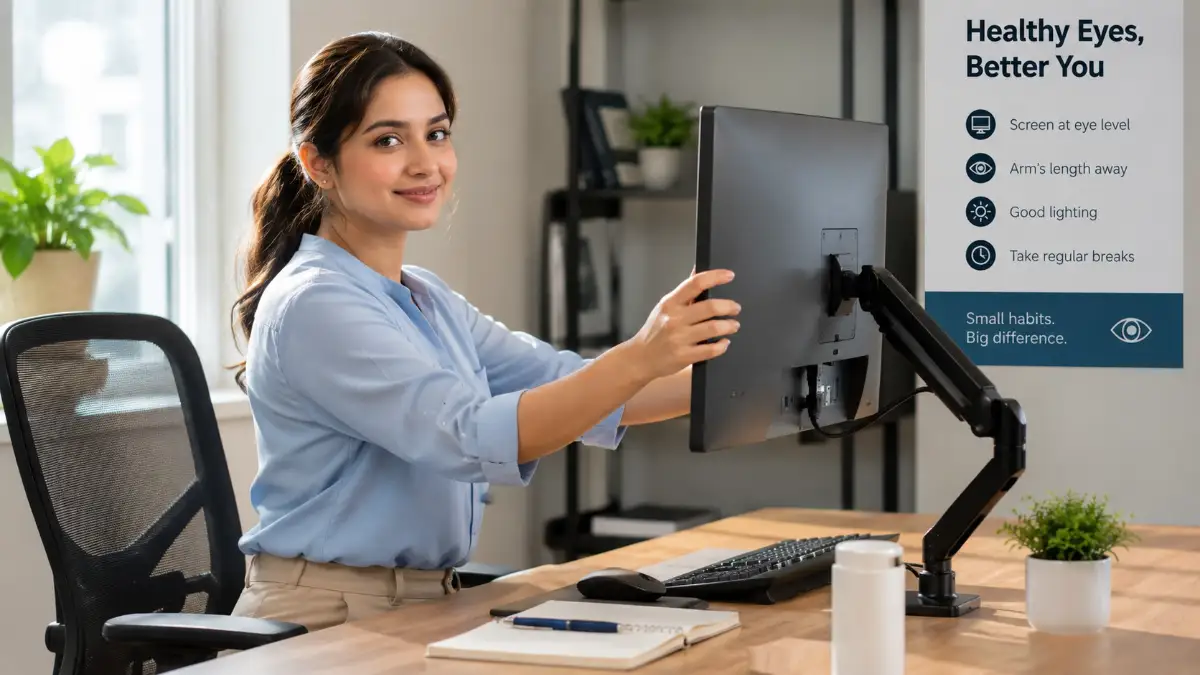
Your computer screen should never be right against your face. You want to keep the monitor about an arm's length away from your body. If you can reach out and just barely touch the screen with your fingertips, you are in the perfect position.
The top of the monitor should rest exactly at your eye level or slightly below it. When you look at the middle of the screen, your eyes should be looking slightly downward. This downward angle actually keeps more of your eye covered by your eyelid, which reduces tear evaporation and dryness.
Managing Glare and Room Lighting
Harsh overhead lighting is a major enemy of comfortable vision. If you have bright fluorescent lights directly above your desk, they will reflect off your screen and hit your eyes. This glare forces you to squint, which causes heavy strain over time.
Instead of bright overhead lights, try using soft floor lamps or desk lamps placed behind your monitor. If you sit near a window, make sure the window is to your side rather than directly behind or in front of your screen.
I used to have my desk facing a bright, sunny window because I loved the view outside. I quickly realized this setup was destroying my eyes, as the massive difference in light between the dark monitor and the bright sun forced my eyes to constantly strain. Moving my desk perpendicular to the window completely stopped my daily afternoon headaches.
The Most Effective Daily Habits for Eye Comfort
Adjusting your workspace is only the first part of the solution. You also need to build specific daily habits that actively protect your vision throughout the day. These practices are incredibly simple, but they require consistency to work effectively.
The Ultimate Rule for Screen Breaks
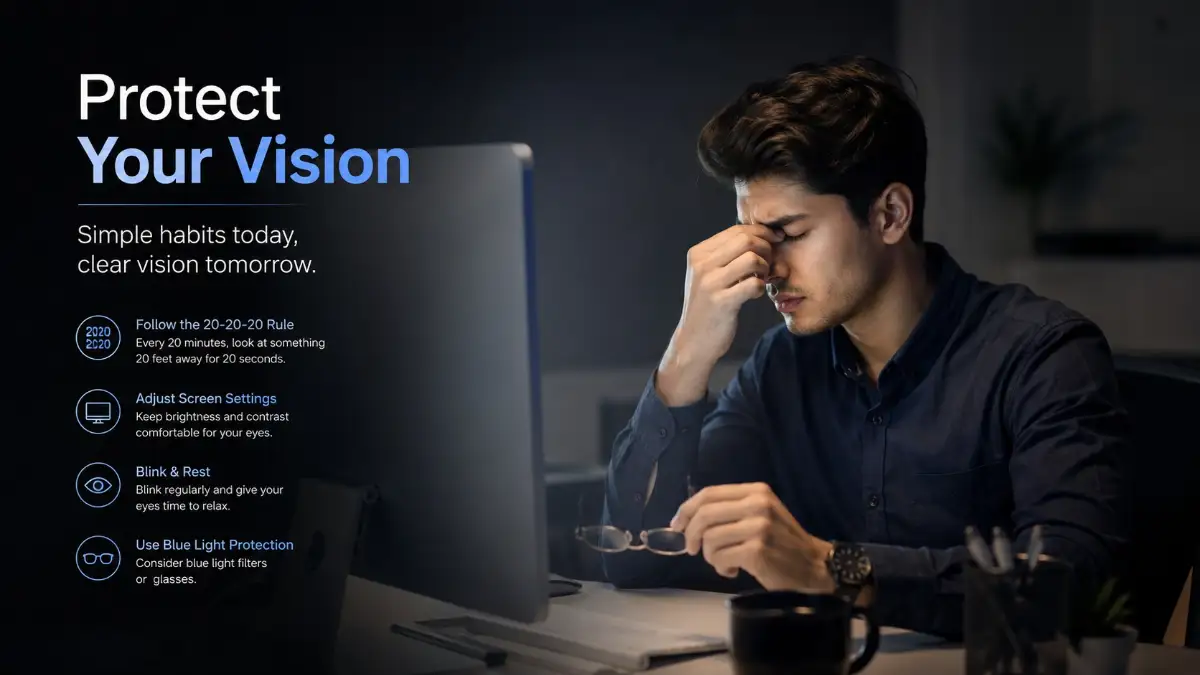
You have probably heard of the 20-20-20 rule before, but very few people actually practice it correctly. The concept is highly effective and backed by eye care professionals everywhere. Every twenty minutes, you need to look at something twenty feet away for a total of twenty seconds.
Why twenty seconds? Because it takes exactly that long for the tiny focusing muscles inside your eyes to completely relax. Staring into the distance acts as a reset button for your visual system.
To make this habit stick, do not rely on your memory alone. Use a simple timer on your phone or install a free browser extension that reminds you to take a break. During this twenty-second pause, make a conscious effort to blink fully and deeply several times.
A Quick Guide to Giving Your Eyes a Break
Below is a fantastic breakdown of how eye strain happens and how you can manage it daily. Watch this quick explanation to fully understand the science behind visual fatigue.
Adjusting Your Digital Display Settings
Your computer has built-in tools designed to make reading much easier on your eyes. Start by increasing the default text size on your operating system and web browser. You should never find yourself leaning forward or squinting just to read a simple article.
Next, adjust the color temperature of your display. High-energy blue light scatters easily in the eye, creating visual noise that reduces contrast. By turning on your device's night mode or blue-light filter, you shift the screen colors to warmer, yellow tones.
Warm tones are significantly softer on your visual system. You should keep this setting turned on throughout the entire workday, not just in the evening. At first, the yellow tint might look a bit strange, but your brain will adjust to it completely within a few minutes.
Nutrition and Internal Care for Your Vision
We often treat eye strain as a purely external problem. However, the health of your eyes depends heavily on what you put into your body. Your eyes require specific nutrients and plenty of hydration to function comfortably under heavy stress.
The Importance of Systemic Hydration
If your body is dehydrated, your eyes will definitely be dry. Your tear glands need a constant supply of water to produce the protective film that covers your eyes. Drinking coffee and energy drinks all day while staring at a screen is a recipe for severe eye pain.
Keep a large bottle of water on your desk and make sure you are drinking from it constantly. Whenever you take your twenty-second screen break, take a sip of water as well. This simple habit tackles the problem of dryness from the inside out.
Foods That Support Eye Health
Your macula, the part of your eye responsible for central vision, relies on specific antioxidants to stay healthy. Adding the right foods to your daily meals can build a natural defense against visual fatigue.
You do not need to eat all of these every single day. Just try to include a handful of nuts or a portion of leafy greens in your regular daily diet. Over time, these small dietary choices build up to create stronger, more resilient eyes.
Creating a Healthy Evening Routine
The way you treat your eyes after work determines how they will feel the next morning. Many of us close our work laptops only to immediately open our personal smartphones. This continuous cycle gives our visual system absolutely zero time to recover from the day.
The Digital Sunset Concept
Try implementing a personal rule where all bright screens are turned off one hour before you go to sleep. This gives your eye muscles the complete rest they desperately need. It also stops artificial blue light from confusing your brain and ruining your sleep cycle.
Instead of scrolling through social media in bed, find an alternative way to relax your mind. You can listen to an engaging podcast, play some soft music, or practice light stretching. Giving your eyes this uninterrupted break ensures you wake up feeling completely refreshed.
Using Artificial Tears Correctly
If your eyes feel incredibly dry at the end of the day, using the right kind of eye drops can offer amazing relief. However, you must be very careful about the type of drops you purchase from the store. Always look for bottles labeled "lubricating drops" or "artificial tears."
Avoid using drops that promise to "remove redness" instantly. These specific products work by forcefully shrinking the blood vessels in your eyes. While they make your eyes look white for a short time, they actually cause severe dryness and irritation when the medicine wears off.
When to Seek Professional Help
While these daily habits are highly effective for most people, they are not a replacement for professional medical care. If you experience sudden blurry vision, flashes of light, or severe pain that does not go away, you need to see an eye doctor immediately.
Regular eye exams are a core part of maintaining your overall health. Your doctor can check for underlying conditions that make screen time more painful. They might also prescribe special computer glasses that are custom-made for the exact distance between your eyes and your monitor.
Taking care of your vision requires a daily commitment to yourself. Your eyes are incredibly resilient, but they still need your help to survive the heavy demands of modern screen time. By adjusting your desk, taking smart breaks, and eating well, you can enjoy a comfortable and highly productive life without the pain.
Mastering Your Screen Habits for Lifelong Visual Comfort
Most people think that taking a quick break every few hours is enough to protect their eyes from digital fatigue. However, achieving true visual comfort requires a much deeper understanding of your environment. You need to actively manage the small details in your workspace that quietly drain your eye moisture.
Let us talk about the air quality inside your office or bedroom. When an air conditioner or a heating vent blows directly toward your face, it acts like a giant hairdryer for your eyes. This constant airflow literally strips the natural moisture right off your corneas. You might not feel the gentle breeze, but your tear glands are working overtime just to keep up.
To fight this, you can easily create a safe micro-climate around your desk. Placing a small, quiet desktop humidifier right next to your monitor adds a constant stream of moisture into the air you breathe. The experts at the National Eye Institute emphasize that adding environmental humidity is one of the easiest ways to fight chronic dry eye symptoms.
The Power of Conscious Blinking Exercises
Earlier, we discussed how staring at a screen drastically reduces our natural blink rate. But just knowing this fact does not automatically fix the problem. You have to retrain your brain to blink fully and completely while looking at bright digital displays.
Every few hours, close your eyes as tightly as you can for about three seconds. Then, open them widely and relax your facial muscles completely. Repeat this simple squeezing motion four or five times in a row.
This specific movement forces the tiny oil glands located in your eyelids to release fresh, hydrating oils onto the surface of your eye. These healthy oils create a protective shield over your natural tears, preventing them from evaporating into the dry office air. Building this habit is exactly like giving every dollar a purpose in your budget, because you are purposely assigning a moment of recovery to your physical health.
The Palming Technique for Instant Relief
When your head is pounding and your eyes feel like they are burning, you need immediate physical relief. This is where a classic eye yoga technique called "Palming" becomes incredibly useful. It takes absolutely zero equipment and provides amazing comfort in less than a minute.
Start by rubbing your hands together rapidly until your palms feel very warm. Close your eyes and gently cup your warm palms over your eye sockets. Make sure you are not pressing down on your actual eyeballs, but just resting the base of your hands on your cheekbones.
The total darkness combined with the soothing heat deeply relaxes your over-worked eye muscles. Doing this for just sixty seconds completely resets your visual system and calms your nervous system down. Developing this daily recovery habit is similar to creating a simple step-by-step action plan for reducing your personal stress levels.
Upgrading Your Display Technology
Sometimes, the root cause of your eye pain is actually the physical hardware you are staring at. Older computer monitors often have incredibly low refresh rates. A low refresh rate means the screen is constantly flickering, even if your conscious brain cannot see it happening.
This invisible flickering forces your pupils to expand and contract thousands of times a day. If you spend most of your week working on a computer, investing in a high-quality monitor with a smooth refresh rate is totally worth it. Look for displays that advertise a "flicker-free" reading mode, which specifically reduces this invisible visual noise.
You can also check your current computer settings to see if you can increase the refresh rate manually. Going from a standard sixty hertz display to something slightly higher can make reading long documents feel completely effortless. Taking control of your hardware settings is just like learning how to force your bank to lower your personal loan rates; you just have to know which buttons to push for maximum benefit.
The Dangerous Traps Destroying Your Eye Health
When people start experiencing severe eye pain, they often look for quick fixes instead of addressing their core habits. This desperation leads to some incredibly common mistakes that actually make the problem much worse over time. Let us look at the specific traps you need to avoid to keep your vision safe.
One of the worst things you can do is work in a completely dark room with a bright monitor glowing in your face. Many people love this "movie theater" aesthetic for their home office setups. However, this creates an extreme contrast ratio between the bright screen and the dark background.
Your eyes simply do not know how to handle this massive lighting difference. Your pupils constantly struggle to adjust to the bright text while trying to process the dark room behind it. According to ergonomic specialists at the American Optometric Association, you must always use balanced ambient lighting in your workspace to prevent heavy visual strain.
The Weekend Screen Binge Trap
Think about how you typically relax after a long, exhausting week of working on your laptop. For many of us, relaxation means laying on the couch and binge-watching a television show or playing video games. We are essentially rewarding our exhausted eyes with even more artificial screen time.
Your eyes do not know the difference between a boring Excel spreadsheet and a highly entertaining Netflix movie. They are still dealing with the exact same blue light, the exact same reduced blink rate, and the exact same focusing fatigue. If you want your eyes to recover for the upcoming work week, you have to find hobbies that do not involve digital displays.
Try going for a long walk outside in natural sunlight to stretch your visual range. Read a physical paperback book instead of an electronic reading tablet. Ignoring your need for real, offline rest is like ignoring a small debt; it will only grow bigger, and eventually, you will need to fix the damage without falling for scams or fake medical promises.
The Posture and Vision Connection
We rarely connect our physical neck pain with our daily eye habits. But the reality is that your vision heavily dictates your entire body posture. When your eyes get tired, you naturally start leaning your head closer to the screen to see the text better.
This aggressive forward head posture puts an unbelievable amount of heavy strain on your neck and shoulder muscles. This physical tension restricts healthy blood flow to your head, which often triggers massive tension headaches. You might think you need stronger glasses, when in reality, you just need to pull your chair closer to the desk and sit up straight.
The professionals at the Mayo Clinic clearly state that proper desk ergonomics directly impact your visual comfort. If your monitor is too low, you will slouch downward. If it is too far away, you will permanently stick your neck out like a turtle.
Your Personal Action Plan for Tomorrow Morning
Protecting your vision is not about giving up your computer or throwing away your smartphone. It is simply about being deeply intentional with how you interact with your digital environment. You have the power to completely change how your body feels at the end of a long workday.
Start tomorrow morning by spending just five minutes adjusting your physical desk setup. Push your monitor an arm's length away, increase your default font sizes, and turn on that warm night-light filter. These tiny, one-time changes will immediately reduce the aggressive strain on your eyes.
Next, commit to taking real, physical breaks away from your desk. Set a gentle timer to remind yourself to look into the distance and blink heavily. Your eyes are meant to view the beautiful, wide world around you, not just the glowing pixels two feet away.
My own battle with digital eye strain taught me how fragile our daily comfort really is. I promise that once I started prioritizing these small breaks, my energy levels skyrocketed and my headaches completely vanished. By taking these simple actions today, you are giving your future self the beautiful gift of clear, painless vision.
Real Questions People Ask About Screen Fatigue
Can digital eye strain cause permanent blindness?
No, staring at computer screens will not cause permanent blindness or permanently damage the physical structure of your eye. However, it can cause chronic, long-term discomfort, severe dry eye syndrome, and massive productivity loss if you do not manage it properly. Taking regular breaks ensures your eyes remain healthy and pain-free.
Do over-the-counter blue light glasses actually work?
For many people, blue light glasses offer genuine relief by slightly increasing screen contrast and blocking harsh lighting. However, they are not a magic shield against poor computer habits. You still need to manage your monitor distance, blink frequently, and take regular screen breaks to see real results.
How long should I wait before looking at my phone in the morning?
You should aim to avoid digital screens for at least the first thirty to sixty minutes after waking up. Your eyes need natural morning light to properly wake up and regulate your body's internal clock. Reaching straight for a bright phone in a dark bedroom shocks your visual system and starts your day with immediate strain.
Are over-the-counter eye drops safe to use every single day?
Yes, but only if you are using preservative-free artificial tears or natural lubricating drops. You should completely avoid any eye drops marketed specifically for "instant redness relief." Those redness drops restrict your blood vessels and can actually cause a terrible dependency that makes your eyes redder over time.
Why do my eyelids twitch when I look at my computer for too long?
Eyelid twitching, technically called myokymia, is your body's physical response to heavy stress, extreme visual fatigue, and high caffeine intake. When you stare at a screen without resting, the tiny muscles around your eye simply go into a light spasm from exhaustion. Resting your eyes, reducing your coffee intake, and getting a good night of sleep will usually stop the twitching completely.
Disclaimer: The information provided in this article is for educational and informational purposes only and does not constitute professional medical advice. Always consult with a qualified eye care professional or doctor regarding any persistent vision issues, eye pain, or specific health conditions you may be experiencing.